- VPS Ready, recommend Debian 12
- RealiTLScanner – https://github.com/XTLS/RealiTLScanner/releases Need to be run on local machine
# MacOS、Linux 命令
# 若是提示文件损坏请 执行 sudo xattr -r -d com.apple.quarantine (app地址)
./RealiTLScanner -addr VPSIP -port 443 -thread 100 -timeout 5 -out file.csv

# Windows 命令(程序在桌面):
cd "%USERPROFILE%\Desktop"
RealiTLScanner-windows-64.exe -addr VPSIP -port 443 -thread 100 -timeout 5 -out file.csv
3. RealityChecker – https://github.com/V2RaySSR/RealityChecker/releases Need to be run on the VPS
# centos 把 apt 换为 yum

apt update
apt install unzip curl wget -y

# 根据自己的系统架构下载相对应的版本 以下为 X86 机型
wget https://github.com/V2RaySSR/RealityChecker/releases/latest/download/reality-checker-linux-amd64.zip
unzip reality-checker-linux-amd64.zip
chmod +x reality-checker

# 开始检测
./reality-checker check apple.com                           # 基础单域名检测
./reality-checker batch apple.com tesla.com microsoft.com   # 批量检测多个域名(空格分隔)
./reality-checker csv file.csv                              # 从CSV文件批量检测域名
4. Install S-UI https://github.com/alireza0/s-ui
# 安装最新版命令
bash <(curl -Ls https://raw.githubusercontent.com/alireza0/s-ui/master/install.sh)

# 要安装所需的旧版本,请将版本添加到安装命令的末尾。例如,ver 1.0.0:
VERSION=1.0.0 && bash <(curl -Ls https://raw.githubusercontent.com/alireza0/s-ui/$VERSION/install.sh) $VERSION
5. After S-UI installed, do not connect externally. Build a SSH tunnel before connect.
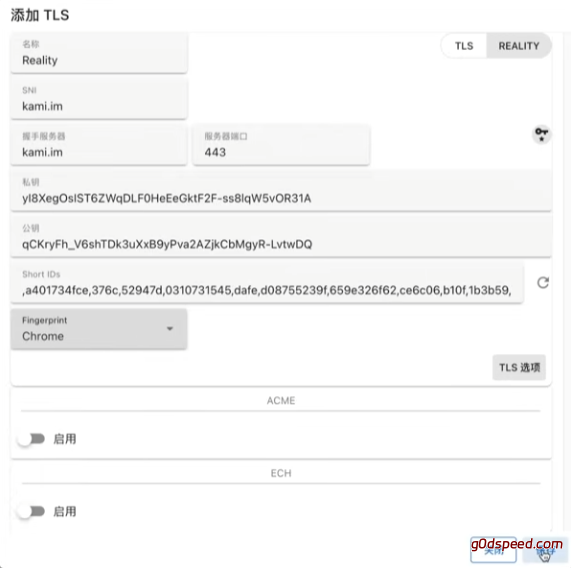
a. TLS Settings – Add TLS
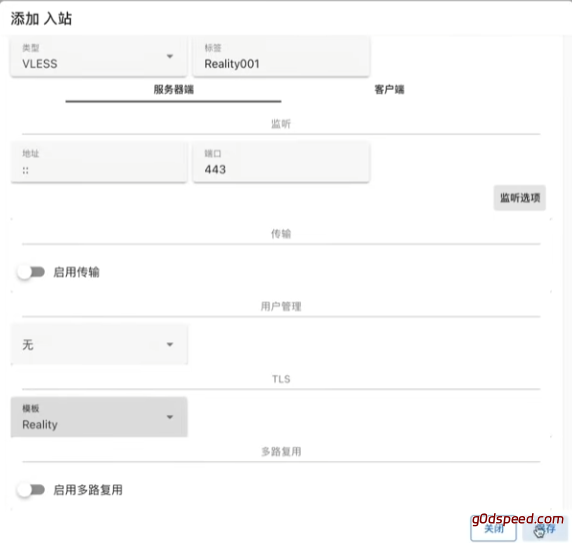
b. Inbounds – Add inbounds
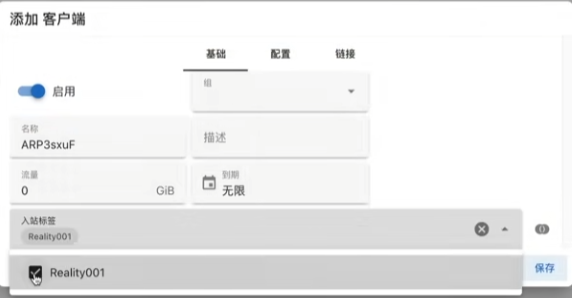
c. Client – add client
d. Client – QR Code – Show LINKS
6. Client
- Windows, MacOS → v2rayN https://github.com/2dust/v2rayN/releases
- Android → NekoBox https://github.com/MatsuriDayo/NekoBoxForAndroid/releases
- iOS → ShadowRocket
Ref:
https://v2rayssr.com/reality-2.html